Founder field note
Product Showcase: How Early-Stage Founders Turn a Launch Into Discovery
Use a product showcase to explain your product, earn qualified feedback, and turn early visibility into a repeatable discovery path for your startup.
A product showcase is a focused presentation of a software product that helps the right people understand what it does, see why it matters, and take a useful next step. For a bootstrapped or early-stage founder, that means combining a clear product explanation, concrete proof, and a relevant action—such as trying the product, sharing feedback, or following the launch—rather than relying on a name and a link to do the selling.
What a Product Showcase is—and what it is not
A showcase gives a product enough context to be evaluated by someone who has never met its creator. It might be a dedicated launch page, a profile on a discovery platform, a demo-led presentation, or a combination of these. The format varies; the job stays the same: make the product legible to a specific audience and give that audience a next step.
It is not simply a landing page with a “Sign up” button. A landing page may be built to convert traffic that already understands the offer. A showcase also has to introduce the product and help visitors decide whether it deserves their attention. Nor is it a guarantee of reach: publishing a listing creates an opportunity for discovery, not proof that the right buyers will arrive.
Before writing copy or recording a demo, decide what a visitor should be able to answer after a short visit:
- Who is it for? Name a role or situation, such as a freelance designer managing client approvals.
- What problem does it address? Describe the frustrating task or costly workaround.
- What can the visitor verify? Show a real workflow, sample output, or product interface.
- What should happen next? Ask for one action that fits the visitor’s readiness.
These answers separate a useful showcase from a feature inventory. “AI-powered workspace with seamless automation” gives a visitor little to check. “Turn a meeting transcript into a draft project brief, then edit and share it” describes an action that can be demonstrated and judged.
Why a showcase matters before a startup has a big audience
Early-stage founders often have a distribution problem disguised as a copy problem. They may know the product deeply but lack a shared context with prospective users. A showcase closes part of that gap by giving an unfamiliar visitor enough information to decide whether to explore further. Clarity reduces the cost of evaluating an unknown product; it does not remove the need to reach the right people.
It can also make feedback more useful. A vague “What do you think?” invites broad opinions. A visitor who sees the target user, core workflow, and current limitations can respond to something specific: whether the output is usable, where setup feels confusing, or what would stop them from switching. That is especially valuable when a founder has a small number of conversations and needs to distinguish a product flaw from a mismatch in audience.
Search can be one source of continuing discovery, but a published page is not automatically visible for relevant queries. Google’s SEO starter guide recommends making content useful and understandable to people, alongside practices that help search engines interpret pages. Treat searchable copy as a way to explain the product plainly—not as a promise of rankings.
Search results also do not always display the description a founder writes. Google explains that snippets are primarily generated from page content and may use the meta description when it better describes the page; its snippet guidance is a reason to make the visible page itself informative, not just its metadata.
A showcase is most useful when it helps with at least one concrete job:
- First-use discovery: a potential user can tell whether the product fits their problem before signing up.
- Launch communication: a founder has one accurate page to share with a community, customer, or investor.
- Feedback collection: a visitor can respond to a clearly described workflow rather than an abstract pitch.
- Investor context: someone researching an emerging company can see what exists today, who it serves, and what evidence is available.
How to build the showcase around a visitor’s decision
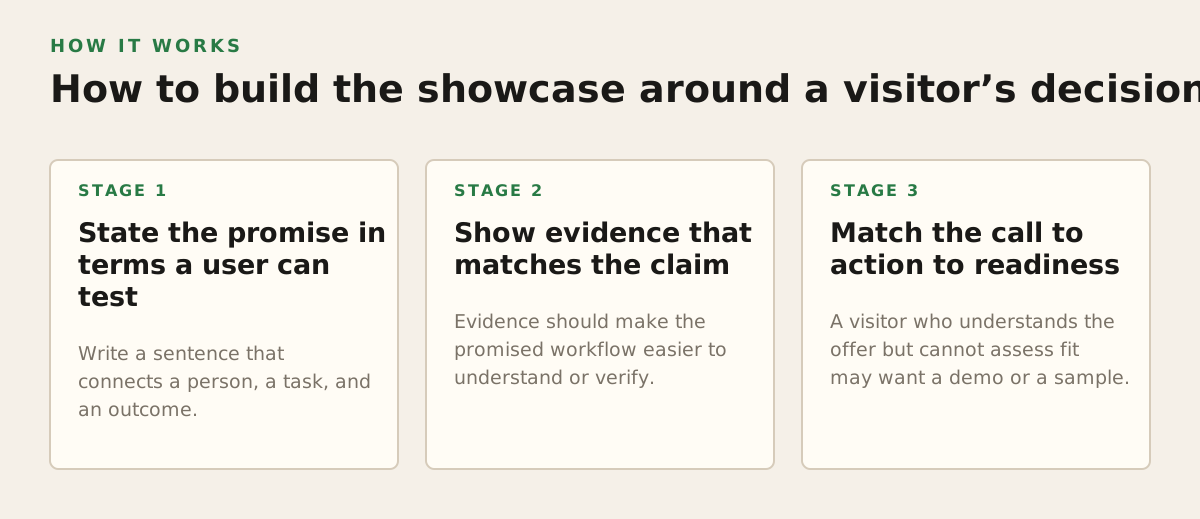
Design the page as a short decision path, not a company biography. A useful order is: audience and problem, product promise, proof, limitations or requirements, and next action. The visitor should not have to infer whether a product is for them from a list of features. Lead with the user’s job, then explain the mechanism that makes the job easier.
1. State the promise in terms a user can test
Write a sentence that connects a person, a task, and an outcome. For example: “For small agencies coordinating client feedback, this tool collects comments on one shared design review.” That sentence is more testable than “The future of collaboration.” If the product is still narrow, say so. A tightly scoped promise can attract better-fit early users than a broad claim the product cannot yet support.
Check that the page distinguishes current functionality from planned work. If automated exports are on the roadmap but not available, do not imply that visitors can use them now. Accurate scope protects trust and gives early adopters a fair basis for deciding whether to try the product.
2. Show evidence that matches the claim
Evidence should make the promised workflow easier to understand or verify. Depending on the product, that could be a short screen recording, annotated screenshots, a sample output, or a working interactive demo. A screenshot of a dashboard is weak proof if the claim is about producing a report; show the report being created instead. If a demo uses sample data, label it as sample data so visitors do not mistake it for customer results.
When screenshots carry meaning, describe that meaning in their text alternatives. The W3C’s Images Tutorial explains how to provide alternative text according to an image’s purpose. For a product screenshot, useful alternative text might identify the screen and the action shown, rather than repeat a decorative caption or list every visible control.
3. Match the call to action to readiness
A visitor who understands the offer but cannot assess fit may want a demo or a sample. Someone ready to test the workflow may want to create an account. A founder seeking product feedback may invite a short, focused response. Choose one primary action and make secondary options less prominent; several equally forceful buttons can leave visitors unsure what to do.
For example, an illustrative showcase for an early writing assistant could use this sequence:
- Opening: “Turn interview notes into a first-draft case study.”
- Proof: a 45-second illustrative walkthrough using clearly labeled sample notes.
- Fit check: a short note that the tool is designed for solo consultants, not a full editorial team.
- Action: “Try the draft workflow” as the primary button, with a separate feedback link for people who have already tried it.
The numbers and duration in this example are illustrative, not performance benchmarks. The test is whether each element helps a visitor make a decision without having to contact the founder for basic context.
Where Product Showcases break down
A polished page can still fail if it attracts attention from people who are unlikely to use the product, or if it makes the product seem more mature than it is. Visibility and validation are different outcomes. Views indicate exposure; they do not establish that a visitor has the problem, understands the offer, or would choose the product over a workaround.
Common failure modes include:
- Feature-first copy: a catalogue of capabilities without a clear user or job.
- Unverifiable claims: broad promises such as “save hours” without an explanation of how the product changes the work.
- Demo friction: a video that starts slowly, hides the important workflow, or requires an account before a visitor can understand the product.
- Audience mismatch: a message aimed at “everyone” that gives a specific early adopter no reason to care.
- Premature polish: a beautiful page that conceals setup requirements, missing features, or the fact that the product is still being shaped.
There is also a measurement trap: treating a launch-day spike as proof of durable demand. Look for the chain between exposure and meaningful action. If visitors arrive but leave before reaching the demo, the explanation may be unclear or the audience may be poorly matched. If they complete the demo but do not start a trial, investigate fit, friction, and the next-step offer before assuming the product needs more traffic.
For search-led discovery, inspect queries and page results rather than guessing what visitors searched. Google’s Search Console performance report includes search queries and measures such as clicks and impressions. These are visibility signals, not customer validation; pair them with product-use evidence or direct conversations before changing the offer.
Search presentation has limits too. Google may generate title links from several page signals, not only a preferred title element, as described in its title link documentation. Use a descriptive title and consistent page headings, but avoid making a launch decision depend on one exact search-result rendering.
How founders can apply a showcase in practice
Start with the decision you need from the next visitor. A bootstrapped founder who needs workflow feedback should not optimize the page only for email sign-ups. A pre-seed team explaining a new category may need a guided demo before asking for a trial. An angel-funded company with a working product may prioritize a direct trial path, while still making audience and product stage easy to understand.
Use the following as an illustrative starting policy—not a universal benchmark—for a small launch review:
- Choose one audience: write the page for one user type and one use case.
- Ask three people in that audience: have them explain what they think the product does after viewing the page, without coaching.
- Record the exact confusion: note which phrase, screen, or requirement caused a wrong assumption.
- Change one major element at a time: for example, revise the opening promise before rebuilding the entire page.
- Check the next action: confirm that the button leads where its label says it will and that the destination continues the same promise.
The number of people and the order above are an example process, not a claim about statistical significance. In a small startup, this kind of review is useful for catching obvious comprehension problems; it cannot establish market size or predict conversion rates. Keep a record of the version shown, the audience, and the feedback so that changes do not become a series of untraceable opinions.
When refining the page, use a short diagnosis:
- If the right people do not recognize themselves in the opening, revise the audience and problem statement.
- If they understand the problem but cannot explain the product, improve the workflow demonstration.
- If they understand the workflow but hesitate, clarify fit, limitations, setup, or the next step.
- If the page is clear but few relevant people arrive, work on distribution rather than endlessly rewriting the headline.
For search, keep the page useful to people first and specific enough to describe the product accurately. Google’s SEO guidance covers making content accessible to users and search systems; no keyword placement can compensate for a page that does not answer a visitor’s question. Treat “product showcase” as a description of the page’s job, not a phrase to repeat in every heading.
For founders who want a launch page and discovery in the same workflow, SuperPublic is an indie-only place to present early-stage products and connect with a founder community. You can submit your product launch and use SuperPublic to explore the platform.
Authored with NotFair SEO