Founder field note
Product Data Sheet Template: A Practical Guide for Startup Launches
Use this product data sheet template to explain your startup clearly, qualify early adopters, support launch promotion, and turn feedback into action.
A product data sheet template is useful when a founder needs one dependable source of truth for explaining a product to early adopters, launch communities, investors, partners, and potential customers. The job is not to make a new brochure full of feature claims. It is to decide which facts help a specific person answer, “Is this relevant to me, and what should I do next?” This guide helps bootstrapped and pre-seed teams choose the right information, organize it for fast scanning, and turn the finished sheet into launch assets without creating contradictory messaging.
A good sheet sits between a landing page and internal product documentation. It should be specific enough to support a buying or sign-up decision, but compact enough that a founder can keep it current. The recommendations below use an illustrative example: SignalNest, a small SaaS product that turns customer interview recordings into searchable research notes for early-stage product teams. Replace that example with your own product, audience, proof, and constraints.
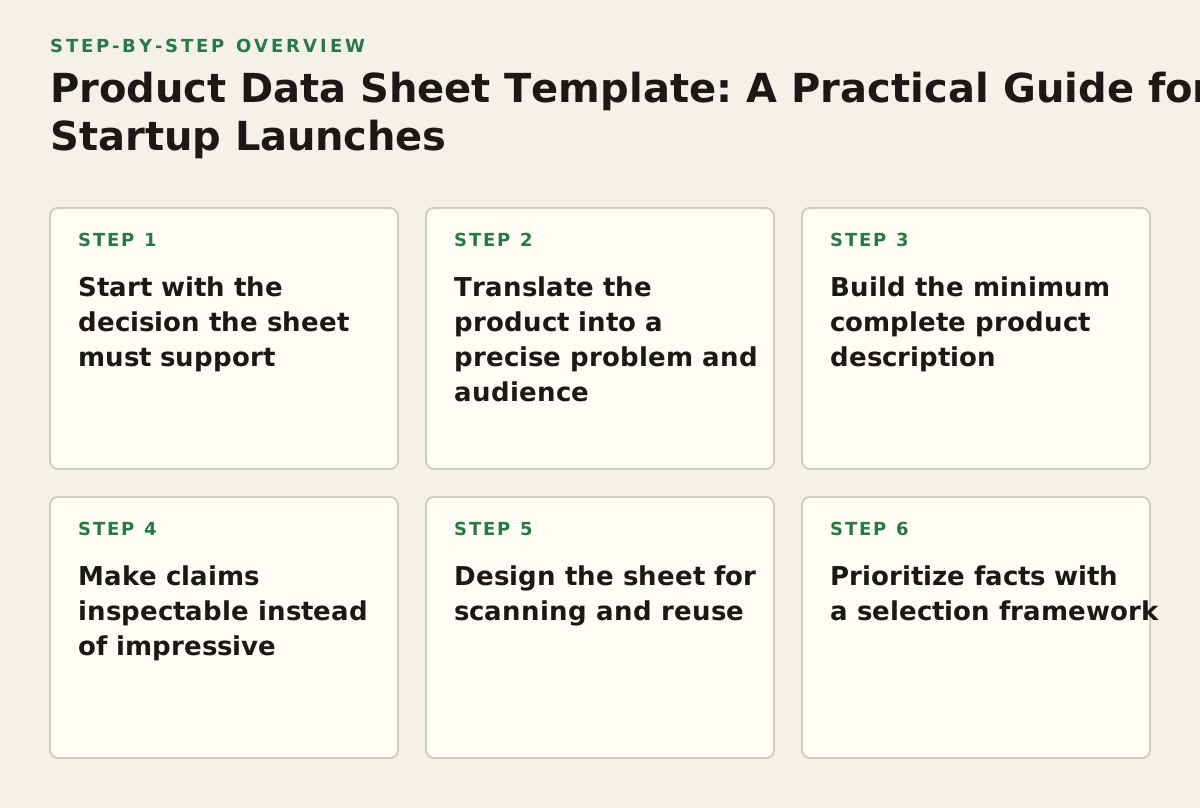
1. Start with the decision the sheet must support
Apply this principle before opening a document or choosing a design. A data sheet becomes bloated when it tries to serve every audience at once. A prospective user needs to know whether the product solves a current problem. A technical evaluator wants to understand setup, compatibility, and limitations. An investor may care about the market and business model. Those are different decisions and should not be forced into identical prominence.
The mechanism is decision-first scoping. Write one sentence describing the decision the reader should be able to make after scanning the sheet. For a launch asset, that decision might be: “I have this problem, the product fits my workflow, and I should try it or request access.” Every field earns its place by helping that decision.
Choose one primary reader
- Early adopter: “Can this remove a painful task without disrupting my workflow?”
- Founder or operator: “Is this mature enough for my team, and how quickly can I evaluate it?”
- Technical evaluator: “Does it work with my environment, data, and permissions?”
- Launch community member: “What is new, distinct, and worth sharing or trying?”
When the sheet is intended for public discovery, make the early adopter the primary reader and keep technical details available as a supporting layer. A failure mode is writing for an imaginary “everyone.” The result is usually a headline like “An all-in-one platform for modern teams,” followed by unrelated features that do not tell anyone whether the product is relevant.
For SignalNest, the decision statement could be: “A product researcher who has scattered interview notes can see whether SignalNest will help them find recurring themes faster, without adopting a full research repository.” That immediately rules out generic claims about “unlocking insights” and gives the sheet a useful boundary.
2. Translate the product into a precise problem and audience
Use this section when your product description currently sounds like a category label, an internal code name, or a feature list. Early-stage products often change direction, but that does not mean their explanation should remain vague. A clear audience and problem statement help the right people self-select while giving the wrong people permission to move on.
The mechanism is problem-to-person mapping. Describe the trigger that causes someone to seek a solution, not merely the industry they belong to. “For SaaS teams” is broad. “For product researchers who need to compare interview themes before a roadmap discussion” identifies a situation, job, and consequence.
Use a compact positioning block
- Audience: the person or team with the problem.
- Trigger: the event that makes the problem urgent.
- Current workaround: the tool, habit, or manual process used today.
- Outcome: what becomes easier, clearer, faster, or less risky.
- Boundary: who the product is not designed for yet.
A failure mode is describing the audience by funding stage rather than behavior. “For startups” does not tell an early adopter whether the product fits. Funding stage can be useful context for a launch story, but it rarely explains the product’s job.
SignalNest’s block might read: “For product researchers and founders reviewing customer interviews. When notes are spread across recordings and documents, SignalNest organizes transcripts into searchable themes so a team can locate supporting evidence before making a product decision. It is designed for lightweight research workflows, not as a full enterprise knowledge-management system.” The boundary is valuable because it prevents a reader from assuming capabilities the product does not claim.
Use plain language even when the product uses technical architecture underneath. Google’s Search Central SEO Starter Guide recommends making content easy to read, well organized, and useful to people rather than writing primarily for search engines; that guidance is relevant to a public product sheet as well as a page intended to be discovered in search. Google Search Central’s SEO Starter Guide documents that principle for 2026.
3. Build the minimum complete product description
Apply this principle when readers understand the promise but still cannot picture what happens after they sign up. A useful data sheet answers operational questions without becoming a manual. The right level is enough detail to set expectations, identify fit, and make the next action feel safe.
The mechanism is progressive disclosure: put the highest-value facts first, then provide supporting detail in a predictable order. Do not hide the actual product behind aspirational language. If the product requires an invite, manual setup, a particular file type, or a specific workflow, say so near the relevant feature.
Recommended information architecture
- Product name and one-line description. State what it does in concrete terms.
- Best-fit user and use case. Name the situation where it earns attention.
- Core workflow. Show the sequence from input to useful output.
- Key capabilities. Include only capabilities that support the stated job.
- Requirements and limits. Explain setup, supported inputs, exclusions, or manual steps.
- Proof and status. Distinguish live functionality, beta access, roadmap items, and examples.
- Next action. Tell the reader whether to try, request access, book a conversation, or share feedback.
A failure mode is treating the feature list as the product description. “AI summaries, semantic search, tagging, collaboration” does not explain a workflow. A reader may like each feature and still not understand why they should change their current process.
For SignalNest, the workflow could be: “Upload or connect an interview recording; review the generated transcript; group excerpts by theme; copy evidence into a research brief.” The sheet should separately state what is available now and what is being considered. If theme grouping is partly manual, describe it as partly manual. Accuracy about the workflow creates better-qualified feedback than a polished but misleading promise.
Use a capability test
Keep a capability if removing it would make the reader misunderstand the product, its fit, or its current status. Move it to secondary documentation if it only satisfies curiosity. For each proposed feature, ask:
- Does this explain an outcome or merely name an implementation?
- Does the target reader care before trying the product?
- Can the team keep this statement current?
- Could the wording imply a guarantee that the product cannot support?
4. Make claims inspectable instead of impressive
This principle matters most for young products with limited case studies, small samples, or features still changing. A data sheet can build trust without inventing authority. The reader should be able to tell which statements are direct product facts, which are founder hypotheses, and which are supported by evidence.
The mechanism is claim labeling. Separate “what the product does” from “what users may achieve” and from “what the team plans to build.” A factual product statement can be inspected in a demo or trial. An outcome statement needs context. A roadmap statement should never appear to be a current capability.
Use three evidence levels
- Current capability: “Exports selected notes as Markdown.”
- Observed or reported outcome: “Early users have used it to prepare interview summaries.” Attribute the source or explain the context when appropriate.
- Hypothesis or direction: “The team is exploring workspace-level permissions.”
A failure mode is using unsupported superlatives: “the fastest,” “the only,” “enterprise-grade,” or “guaranteed.” These words create a burden the sheet may not be able to meet. They also attract the wrong kind of scrutiny when an early product is still learning its market.
For SignalNest, replace “turns hours of research into instant insights” with “helps a researcher search transcripts and collect excerpts for a research brief.” If the team has a specific, documented observation, it can add: “In an illustrative internal workflow, a founder used the search-and-excerpt flow before a roadmap review.” Labeling that as an example avoids presenting it as a universal result.
Be equally careful with security, privacy, and compliance language. Do not imply certifications, encryption arrangements, retention policies, or regulatory status unless the team can document the exact claim. A short “Data handling” note that says what is collected, where the user can find the policy, and what the product does not promise is more useful than a vague trust badge.
Structured data can help search engines interpret a software product, but it does not make unsupported claims credible. Schema.org’s SoftwareApplication vocabulary lists properties that may describe software applications; use only fields that accurately represent the product and keep the visible sheet consistent with the structured information.
5. Design the sheet for scanning and reuse
Use this principle when the same product is being introduced in a launch post, direct message, partner conversation, demo follow-up, and website page. The data sheet should not be a single beautiful PDF that becomes impossible to update. Treat it as a structured content source from which smaller assets can be safely derived.
The mechanism is modular content design. Give every block a clear job and make the important facts readable without requiring a linear read. A founder should be able to reuse the one-line description, audience statement, capability bullets, and call to action without rewriting them from memory.
Recommended layout order
- Top section: name, category, one-line promise, audience, and primary action.
- Middle section: workflow, three to five capability blocks, and “how it differs.”
- Evidence section: screenshots, sample output, user quote with permission, or clearly labeled example.
- Qualification section: requirements, limitations, availability, and data-handling link.
- Footer: owner, version date, contact, and canonical product URL.
A failure mode is optimizing for visual density. Tiny type, decorative diagrams, and long paragraphs make the sheet difficult to use in a founder email or on a phone. Another failure is creating separate versions for every channel and allowing their claims to drift.
SignalNest could maintain one source document with stable blocks: description, audience, workflow, capabilities, limitations, proof, and action. A launch post can use the first four blocks. A potential partner can receive the same sheet with the requirements and data-handling sections visible. When the product changes, the founder updates the source and checks each published derivative.
Accessibility is part of reuse, not a final cosmetic pass. The W3C’s WCAG guidance explains requirements and techniques for readable contrast and distinguishable content, including the use of sufficient contrast between text and its background. See Understanding Success Criterion 1.4.3: Contrast (Minimum). In practice, use real text rather than text embedded only in images, descriptive link labels, logical headings, and a layout that remains understandable when enlarged.
6. Prioritize facts with a selection framework
A template is valuable only if it helps you decide what to leave out. When every founder wants to mention every feature, use a repeatable scoring policy rather than relying on taste. This is especially important for AI tools and infrastructure products, where technical detail can overwhelm the user problem.
The mechanism is reader-value scoring. Rate each possible field on its effect on fit, decision confidence, and actionability. These ratings are not market benchmarks; they are an illustrative starting policy for deciding what belongs in the first version of a sheet.
| Candidate information | Fit signal | Decision confidence | Actionability | Placement policy |
|---|---|---|---|---|
| Primary use case | High | High | High | Place near the top; keep concrete and audience-specific. |
| Core workflow | High | High | High | Show as steps or a short example. |
| Supported input or output | High | High | High | Include when incompatibility would block evaluation. |
| Secondary convenience feature | Low to medium | Low | Medium | Include only if it differentiates the target workflow. |
| Technical architecture | Variable | Medium | Variable | Use a technical appendix or linked documentation when needed. |
| Roadmap item | Low | Low | Low | Label clearly or omit from the public sheet. |
| Unqualified performance claim | Unclear | Low | Low | Remove unless scope, method, and source are available. |
| Next action and contact route | High | High | High | Repeat once at the end, with no competing primary action. |
A failure mode is scoring everything as high because the team considers every feature important. Force a trade-off: if a detail does not affect fit or the next action for the primary reader, move it out of the main sheet.
For SignalNest, supported audio formats might score high because an incompatible recording prevents evaluation. A note about the internal model architecture might score low for a product researcher but high for a technical buyer. The correct answer is not to delete it forever; it is to place it in a technical version or linked documentation for the audience that needs it.
7. Turn the sheet into a launch and feedback instrument
Apply this principle when the sheet is meant to do more than explain. A launch asset should help a founder attract the right early adopters and learn what remains unclear. If everyone clicks but no one is a fit, the sheet may be optimized for attention rather than qualified discovery.
The mechanism is message-to-feedback linkage. Give readers a low-friction way to respond to the specific assumptions in the sheet. Ask whether the use case matches, which requirement blocks them, and what they expected the product to do. This turns passive views into evidence for the next product and messaging decision.
Build a feedback-ready call to action
- State the action: try the product, request access, send a use case, or join a conversation.
- State the expected input: “Tell us what you currently use to organize interview notes.”
- Set the product status: available, private beta, invite-only, or actively being shaped.
- Give one route for response so feedback does not scatter across unrelated inboxes.
- Record the source and version so the team knows which sheet generated the response.
A failure mode is asking for broad feedback such as “Any thoughts?” It produces polite reactions rather than information about the riskiest assumption. Ask a falsifiable question instead: “Would searching transcript excerpts solve a problem you encounter at least occasionally, or is your bottleneck somewhere else?”
For SignalNest, the closing block could say: “Try the current workflow if you regularly review customer interviews. If you do not, reply with the kind of research evidence you struggle to retrieve; we are deciding whether to support additional sources.” That wording attracts a relevant audience while acknowledging that the product direction is not fixed.
When publishing a launch page, use a stable canonical URL and keep the sheet’s version date visible. Google’s documentation on canonicalization explains why publishers should help search engines identify the preferred version of substantially similar pages; the Google Search Central guide to consolidating duplicate URLs is the relevant reference. This matters when a product description appears on a homepage, launch page, documentation page, and downloadable file.
8. Maintain truth as the product changes
Use this principle once the first version is published, especially if the startup is shipping weekly or running a beta. The most damaging sheet is not an incomplete one; it is a confident one that quietly describes an old product. Outdated requirements send qualified users away, while outdated capability claims create disappointed users.
The mechanism is content ownership and change control. Assign an owner, a review trigger, and a visible version date. The owner does not need to be a marketer. It should be someone who can verify the product behavior, availability, and limitations.
Create a lightweight maintenance register
- Field: the statement being maintained.
- Source of truth: product documentation, interface, policy, or owner.
- Change trigger: release, pricing change, integration change, policy update, or positioning shift.
- Reviewer: person responsible for approval.
- Last checked: date in 2026 or the applicable future review date.
- Published locations: pages, files, launch profiles, and sales materials using the field.
A failure mode is reviewing only when someone notices an error. Add the sheet to the release checklist. Also review it when a founder changes the signup flow, modifies supported inputs, adds a major capability, or changes the intended audience.
For SignalNest, a release that changes transcript handling should trigger review of the workflow, requirements, data-handling note, screenshots, and call to action. If the product now requires a connected workspace instead of a file upload, the old sentence should be removed everywhere, not merely corrected in the main document.
Implementation plan: create, publish, and improve the sheet in sequence
Use the following sequence for a first version in 2026. The time references below are an illustrative starting policy, not a universal benchmark. A solo founder may complete the work in one sitting; a regulated or technically complex team may need formal review.
- Write the decision sentence. Choose the primary reader, the trigger, and the next action. Do not draft feature copy until these are fixed.
- Inventory the facts. List the current workflow, capabilities, requirements, limitations, proof, status, and links. Mark each item as current capability, observed outcome, or hypothesis.
- Score and cut. Use the selection table. Keep the information that changes fit or increases confidence. Move technical depth to supporting documentation.
- Draft the top block. Write the product name, one-line description, audience, use case, and action in plain language. Remove category clichés and unqualified superlatives.
- Show the workflow. Describe the input, the meaningful product action, and the output. Include a concrete example that a prospective user can recognize.
- Add qualification details. State supported inputs, setup requirements, current availability, limits, and data-handling references. Label beta or roadmap material unmistakably.
- Run a claim review. Ask a person who did not write the sheet to identify every promise, implied guarantee, missing limitation, and ambiguous phrase. Replace anything the team cannot substantiate.
- Run a scan and accessibility review. Check headings, link labels, contrast, mobile readability, copyable text, file naming, and whether the primary action is obvious without a full read.
- Create controlled derivatives. Reuse approved blocks for the website, launch post, outreach message, and partner version. Keep one source of truth and record the published locations.
- Publish where qualified people can discover it. Founders can submit your product launch with the clearest version of the description, audience, workflow, and next action rather than pasting an unedited feature dump.
- Review the feedback by assumption. Sort responses into audience fit, problem urgency, workflow clarity, missing requirement, trust concern, and product request. Change one high-impact assumption at a time so the next version teaches you something.
- Set the next review trigger. Put the owner and version date on the sheet, then attach updates to releases and meaningful changes in positioning, availability, or data handling.
The practical recommendation is to publish a minimum complete sheet, not a maximal one: one clear audience, one recognizable problem, one honest workflow, the requirements that can block evaluation, and one next action. Once those pieces are accurate, use feedback from early adopters to decide which technical or proof details deserve a second version. SuperPublic gives indie founders a place to make that launch discoverable and connect the sheet to a wider early-stage product audience through SuperPublic.
Authored with NotFair SEO