Founder field note
Bootstrapped Startup Launch Submission Examples: Six Patterns Founders Can Adapt
Use bootstrapped startup launch submission examples to write a sharper listing, show credible proof, and match your launch story to the right early users.
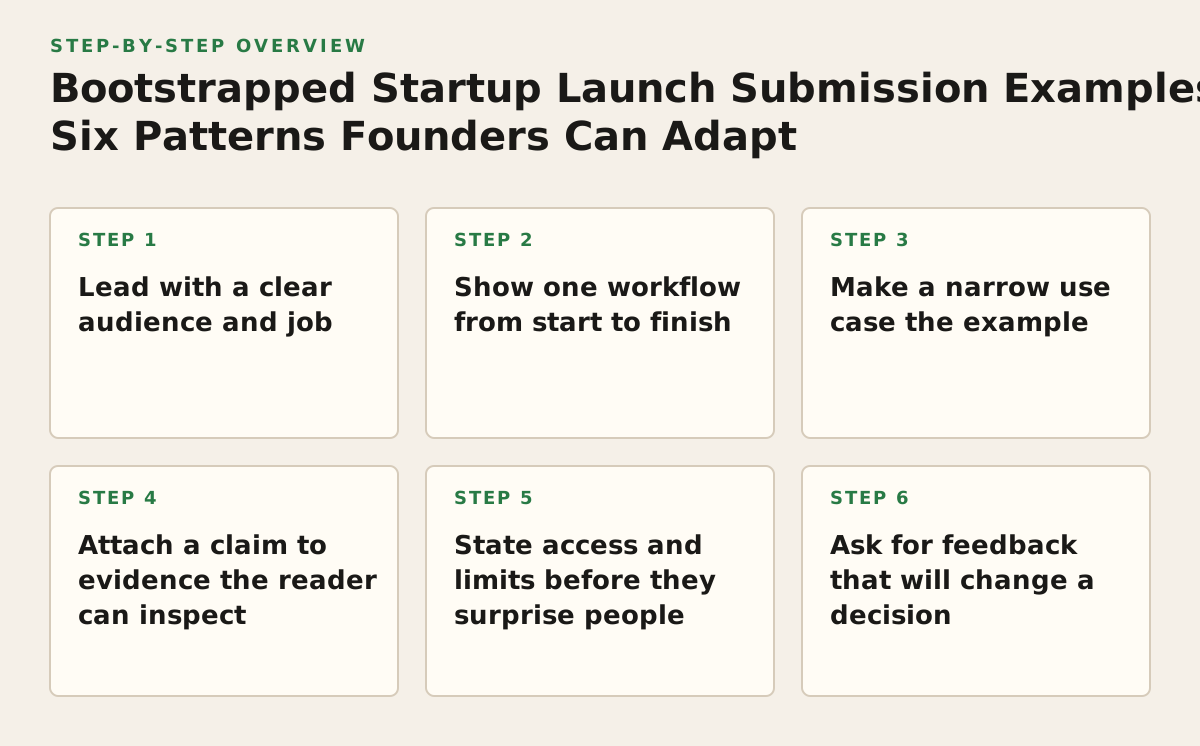
The best bootstrapped startup launch submission examples make it easy to understand who a product helps, what it does, and why it is worth trying. Below are six adaptable patterns—from a focused headline to a useful feedback request—plus a selection framework for deciding which to use. Treat the examples as templates, not claims about real companies: replace the illustrative details with facts you can support.
1. Lead with a clear audience and job
Use this pattern when your product could be described in several ways, or when a broad category label does not tell a visitor whether it fits their work. A useful opening pairs a specific audience with the task they want to complete. It works because readers can quickly recognize their situation without having to decode a list of features.
Reusable example
“A lightweight appointment reminder tool for independent tutors who manage lessons by email.”
This illustrative line identifies a user and a job, but avoids promising an outcome such as fewer missed lessons unless you have evidence for that claim. Adapt it by naming the narrowest audience you can genuinely serve and the task your product handles. If your listing has room for a second sentence, use it to clarify the product category or what makes the workflow distinct.
- What it demonstrates: a defined user and a recognisable task.
- Why it works: it helps a prospective user decide whether to keep reading.
- Failure mode: naming an audience so narrow that it misrepresents who can use the product, or using a vague label such as “for everyone.”
Google’s search guidance recommends making page titles descriptive and concise; that is a useful discipline for a launch headline, too, though a listing is not the same thing as a search result. See the Google SEO Starter Guide for its advice on descriptive page titles.
2. Show one workflow from start to finish
Choose a workflow example when a feature list makes your product sound interchangeable with alternatives. Show a small sequence that a real user can picture, rather than claiming the software “streamlines everything.” This pattern is especially useful for a new SaaS product whose value lies in how several steps fit together.
Reusable example
“Paste a meeting transcript, review the extracted decisions, then export the action list for your team.”
This illustrative workflow tells a reader what goes in, what the product does, and what comes out. Adapt it using only steps that exist in the product today. If the result needs manual review, include that step rather than implying the software is fully automatic.
- What it demonstrates: the product’s role in a task, not just its feature names.
- Why it works: a concrete sequence lets a reader assess fit before signing up.
- Failure mode: describing an idealised workflow that skips setup, human review, or a required external tool.
A short screen recording or a sequence of annotated screenshots can support this pattern. Keep the sequence focused on one job; a tour of every menu makes it harder to see the central use case. For text that accompanies a demo, use descriptive headings and straightforward language. The W3C tips on writing for web accessibility offer practical guidance on clear, structured web content.
3. Make a narrow use case the example
Pick a use-case example when the product serves multiple kinds of users but the launch needs one memorable entry point. Rather than describing the whole market, show a plausible moment when one group would reach for the product. This is a positioning choice, not a claim that the product is useful only to that group.
Reusable example
“For a solo consultant preparing a client handoff: collect the project links, open questions, and next steps in one shareable brief.”
The example gives the reader a situation and an intended output. It does not assert that every consultant has this problem or that the tool guarantees a better handoff. Adapt it by choosing a use case you can demonstrate, then naming what the user would create or complete.
- What it demonstrates: a product in context, tied to an identifiable user moment.
- Why it works: early adopters can judge relevance against a task they already recognise.
- Failure mode: choosing a niche only because it sounds distinctive, without confirming that the product supports its workflow.
Keep the example honest about the product’s boundaries. If the handoff brief still has to be copied into another system, say so where that detail affects a buyer’s decision. A narrow example should make the product easier to evaluate, not conceal setup or manual work.
4. Attach a claim to evidence the reader can inspect
Use evidence-led copy when your submission includes a claim about reliability, speed, savings, or results. The goal is not to fill the listing with numbers; it is to let a reader distinguish a verified fact from a founder’s expectation. A working product can often show evidence through a sample output, a short demo, or a clearly described method.
Reusable example
“Export a sample report as CSV. The example file shows the current columns; check the preview before importing it into your own workflow.”
This illustrative copy makes a specific, inspectable claim about an output and tells the reader what to verify. If you have a measured result, state the measurement context and source; do not present a single user’s experience as a general outcome. If you do not have measured results, show the product artifact instead of inventing a metric.
- What it demonstrates: evidence that a visitor can examine, rather than an unsupported superlative.
- Why it works: it lowers the effort required to evaluate a product’s concrete capability.
- Failure mode: using a screenshot that hides important caveats, or quoting a result without explaining how it was measured.
For links you share in different launch placements, use distinct campaign parameters if you need to tell visits apart in Google Analytics. Google’s campaign URL builder guidance explains how parameters such as source and medium are used. Tracking can indicate where a visit came from; it does not by itself prove that a particular placement caused a signup.
5. State access and limits before they surprise people
Clarify the current access path when a product is in beta, requires an invitation, has a waitlist, or depends on a setup step. This is a practical submission example because a launch can attract the right attention and still frustrate visitors if they cannot tell what happens after they click. Describe the current state, not a roadmap promise.
Reusable example
“The preview is invitation-only. Request access with your work email; we’ll confirm availability before asking you to set up a workspace.”
This wording is illustrative. Use it only if those steps are accurate for your product. If access is open, say what a visitor can do immediately. If a feature is not ready, name the limitation and offer an accurate alternative, such as joining a waitlist—only if you actually maintain one.
- What it demonstrates: the next step and a constraint a visitor needs to know.
- Why it works: people can decide whether the available version suits their needs now.
- Failure mode: presenting an unreleased capability as available, or implying that access is guaranteed when it is not.
Keep this information consistent across the submission, product page, and signup flow. If a listing links to a demo, explain whether it is a live product, a sample environment, or a recorded walkthrough. That distinction helps visitors interpret what they see and what they can actually try.
6. Ask for feedback that will change a decision
Make the feedback request specific when your immediate goal is learning rather than broad awareness. “Thoughts?” gives visitors no clear direction. A useful prompt asks about one uncertain decision—such as onboarding clarity, a missing workflow step, or which of two use cases matters more—and gives people a reasonable way to respond.
Reusable example
“If you manage projects alone, which would help you more in the first session: a ready-made checklist or a blank template? Tell us what you expected to see.”
This illustrative prompt asks about a product decision and the reasoning behind it. It does not assume respondents represent the whole market. Adapt it to a question whose answer could change your next product iteration, and avoid asking for sensitive information in a public comment.
- What it demonstrates: a bounded question connected to a founder’s next decision.
- Why it works: a visitor can answer from a relevant experience instead of guessing what kind of feedback you want.
- Failure mode: treating a few enthusiastic responses as proof of demand or asking questions that cannot affect the product.
When feedback is the priority, make the request visible near the relevant example or demo. When acquisition is the priority, make the primary next step the signup or product trial instead. One launch page can support both, but a competing set of calls to action can make the intended next step unclear.
Choose the example that matches your launch constraint
Use this framework to pick a lead pattern before polishing copy. The strongest example is not automatically the most elaborate one; it is the one that answers the main question a prospective user has at this stage. If two rows seem equally relevant, choose the one for which you can provide the clearest proof.
| Your current constraint | Lead with | Useful supporting material | Hold back when |
|---|---|---|---|
| Visitors cannot tell who the product is for | Audience-and-job headline | A concrete user and task | The audience label is broader than your product can support |
| The category sounds generic | Start-to-finish workflow | A short demo or example output | The depicted sequence is not available in the current product |
| The product could fit many markets | Narrow use case | A scenario grounded in a real supported task | You have no credible reason to feature that niche |
| Readers may doubt a capability claim | Evidence-led example | An inspectable artifact or explained measurement | The evidence is private, unclear, or not representative |
| Access is limited or conditional | Access-and-limits explanation | The actual next step and current constraint | The stated process is not the one visitors will encounter |
| You need to resolve one product question | Specific feedback prompt | A decision you could change based on responses | You have no plan to act on the answer |
Do not try to make every pattern the headline. Choose one lead example, then use supporting material only where it resolves a different uncertainty. If you publish a longer product description in Markdown, GitHub’s formatting guide covers headings, lists, and links; use those structures to make the copy scannable, not to add decoration.
Build and check the submission in sequence
Work through these steps in order. Each one has a decision gate, so you can fix a weak premise before spending time on launch assets or traffic tracking.
- Choose the reader and task. Write one sentence naming who the launch is for and what they are trying to do. If you cannot name a plausible user group, interview or observe likely users before widening the claim.
- Select the lead pattern. Use the table to choose the example that addresses your largest current uncertainty. Keep the other patterns as supporting material only if they answer separate questions.
- Check every product claim. Mark each statement as a current capability, an observed result, a planned feature, or an opinion. Remove or qualify anything that a visitor could mistake for a present-day fact.
- Prepare one proof asset. Pick a demo, sample output, or clear description that supports the lead pattern. Check that it represents the product as it exists and does not expose private user information.
- Test the next step. Follow the visitor path yourself: open the listing, click the main action, and check that the destination explains access and any relevant limitations. Fix mismatches before sharing the listing.
- Decide what you will learn. Choose one outcome to monitor—such as qualified visits, completed signups, or responses to your feedback question—and label campaign links consistently if you need to distinguish placements. Treat the signal as a prompt for investigation, not automatic proof of product-market fit.
When the listing is ready, founders can submit your product launch through SuperPublic. SuperPublic supports indie product discovery and launch-page publishing, with community engagement signals that can help founders see how a launch is being received. If that suits your next step, explore SuperPublic.
Authored with NotFair SEO